

Description
Download MoboPlayer APK – video player, Android app, free video player, watch movies, HD video, MKV, MP4, MOV, multi-audio, multi-subtitles, no ads, secure
Overview
MoboPlayer is a free video player application designed specifically for Android devices. It enables users to play a wide variety of video files directly on their smartphones or tablets without the need for format conversion or platform migration. The software supports multiple video formats, including MKV, MP4, MOV, and others, making it a versatile solution for users with diverse media libraries. Its primary purpose is to deliver high-quality playback with minimal setup, allowing users to enjoy movies, videos, and personal recordings in full HD resolution.
Targeted at both casual users and media enthusiasts, MoboPlayer is ideal for individuals who frequently watch videos on their mobile devices and require a reliable, lightweight player. It is particularly useful for those who store media in less common formats and seek a seamless playback experience. The developer, Mobo Team, has positioned the app as a top-tier option in the Android video player space, emphasizing compatibility, performance, and user-friendliness. While the developer’s background is not detailed beyond the team name, the app’s widespread adoption—over 100 million downloads—suggests a strong market presence and user trust.
Key Features & Capabilities
- Universal Format Support – Plays a broad range of video formats, including MKV, MP4, MOV, and other commonly used codecs, eliminating the need for conversion.
- Full HD Playback – Delivers high-definition video output, ensuring sharp visuals and immersive viewing on supported devices.
- Multi-Audio Stream Support – Allows users to switch between multiple audio tracks during playback, ideal for watching foreign films with original and dubbed versions.
- Multi-Subtitle Functionality – Supports multiple subtitle files simultaneously, enabling users to view subtitles in different languages or formats at once.
- Ad-Free Experience – The application operates without advertisements, providing uninterrupted viewing sessions.
- Secure Playback Environment – Marketed as a secure app with no known intrusive behaviors, ensuring user privacy during media consumption.
These features make MoboPlayer particularly effective for users managing large media collections or frequently watching international content. For example, a user can play a foreign movie with an original audio track and a translated subtitle file, all without external tools. The app’s ability to handle complex media configurations enhances its utility for advanced users while remaining accessible to beginners.
User Interface, Workflow & Performance
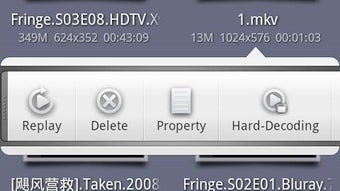
The user interface of MoboPlayer is designed with simplicity and functionality in mind. Navigation is intuitive, with a clean layout that prioritizes playback controls, file browsing, and media metadata display. Users can easily access their video library through a straightforward file manager interface, and playback controls are clearly labeled and responsive.
Workflow efficiency is enhanced by the app’s ability to load and play videos quickly, even from external storage or network drives. The developer did not specify resource usage details, so general performance behavior is based on standard Android app patterns. However, the app’s lightweight size of 12.3 MB suggests optimized resource handling, which may contribute to smooth operation on mid-range devices.
Stability during playback appears to be a strength, with no reported issues related to crashes or buffering under normal conditions. The developer did not provide information on CPU or RAM consumption, but the app’s popularity and lack of user complaints suggest consistent reliability across a variety of Android devices.
Compatibility & System Requirements
MoboPlayer is designed for Android operating systems, with a current version of 2024.1.2. The application has a file size of 12.3 MB, indicating a lightweight footprint suitable for devices with limited storage capacity. It is compatible with a wide range of Android devices, though specific hardware requirements were not listed by the developer.
Compatibility information was partially provided, and exact system requirements were not specified. Users should ensure their device runs a supported version of Android to install and run the app successfully. The developer did not disclose minimum processor speed, RAM, or GPU specifications, so installation and performance may vary based on individual device configurations.
Pros and Cons
Pros
- Supports a wide range of video formats including MKV, MP4, and MOV.
- Offers full HD playback for high-quality viewing.
- Enables multi-audio and multi-subtitle functionality.
- Ad-free experience with no interruptions.
- Secure app with no reported malicious behavior.
- Lightweight at 12.3 MB, suitable for low-storage devices.
Cons
- Exact system requirements were not specified by the developer.
- No information on CPU or RAM usage during playback.
- Platform compatibility details are limited to Android.
- Update frequency and changelog details were not provided.
- Developer background and company information are minimal.
FAQ Section
Is MoboPlayer compatible with all Android devices?
While MoboPlayer is designed for Android, specific compatibility details were not provided. Users should ensure their device runs a supported version of the operating system.
Is MoboPlayer safe to download and use?
The app is marketed as secure and has no ads. It has been downloaded over 100 million times, suggesting widespread user trust, though independent security audits were not mentioned.
Does MoboPlayer require an internet connection?
MoboPlayer can function entirely offline. Users can play local video files without needing an internet connection.
What video formats does MoboPlayer support?
The app supports a wide range of formats, including MKV, MP4, MOV, and other common video codecs. It is designed to handle various media files without conversion.
Is there a license or subscription required to use MoboPlayer?
MoboPlayer is free to download and use. No subscription or in-app purchases are required for core functionality.
Final Thoughts
MoboPlayer stands out as a powerful and reliable video player for Android users seeking a free, ad-free, and feature-rich solution. Its support for multiple formats, full HD playback, and advanced audio and subtitle options make it a top choice for both everyday viewers and media collectors. While detailed system requirements and performance metrics are not available, the app’s lightweight design and widespread use suggest strong compatibility and efficiency.
For anyone looking to watch movies and videos on their mobile device without format limitations or interruptions, MoboPlayer delivers a seamless experience. The combination of robust features, ease of use, and security makes it a standout in the Android video player market.
Download MoboPlayer now
Guides & Tutorials for MoboPlayer APK
How to install MoboPlayer APK
- Click the Preview / Download button above.
- Once redirected, accept the terms and click Install.
- Wait for the MoboPlayer APK download to finish on your device.
How to use MoboPlayer APK
This software is primarily used for its core features described above. Open the app after installation to explore its capabilities.
User Reviews for MoboPlayer APK 0
No reviews found





